No app store required
Get the BeatStore App
Install BeatStore on any device straight from your browser — iOS, Android, or Desktop — and get the full app experience in seconds.
Quick Access
Launch BeatStore directly from your desktop or home screen.
Lightweight & Fast
Installs in seconds and takes up almost no storage compared to native apps.
App-like Experience
Runs in its own window without any browser UI in the way.
Automatic Updates
Always get the latest features — no manual updates needed.
How to install BeatStore
Pick your device and follow the quick steps below.
Method 1: Using the Install Button
- 1Click the "Download App" button above (if visible).
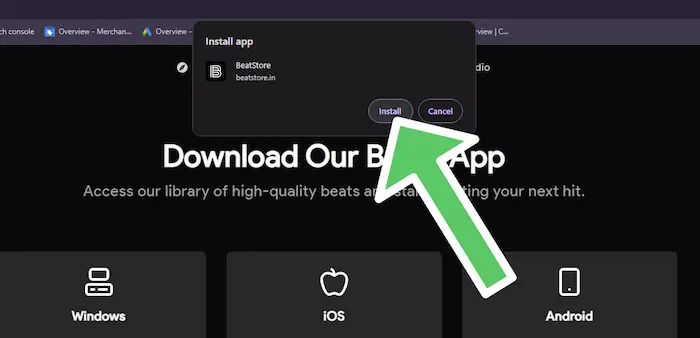
- 2Confirm the installation in the browser prompt.
- 3Launch BeatStore anytime from your desktop or app menu.
Method 2: Using the Browser Menu
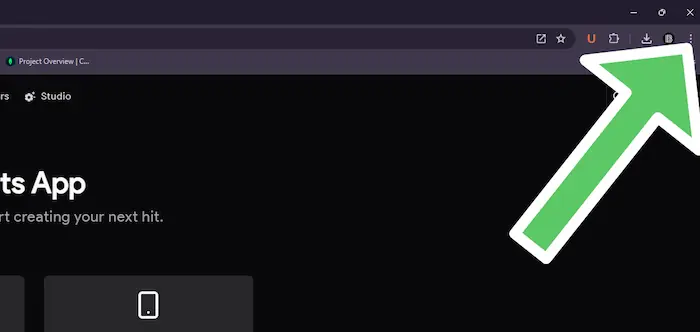
- 1Chrome/Edge: Click the install icon in the address bar, or go to Menu → "Install BeatStore".
- 2Safari: Not supported on macOS — use Chrome or Edge instead.
- 3Follow the installation prompt to add the app to your system.
Visual Guide
Step 1: Click the install icon in the address bar
Step 2: Confirm installation